
You found it: a brick-built tram, a castle, a temple you can't stop thinking about. Someone designed it, photographed it and posted it online. Now you want it on your shelf. This is where most builders get stuck, because a design is not a box of bricks. This guide shows how to get from "I want that" to a parcel on your doormat holding every part and the instructions, in a single order.
In 30 seconds
- A MOC ("My Own Creation") is a fan-designed build. On BuyMeBricks you buy it as one order: all the parts plus the PDF instructions.
- The price is live parts cost + the designer's fee, both shown separately on every product page.
- A "% complete" badge tells you before you pay if a reference can't be supplied. You're only charged for what ships.
- Expect 2–4 weeks door to door to Europe and the USA. Shipping is free on parts orders over $50 to most destinations.
1. What is a MOC, exactly?
MOC stands for My Own Creation: any model designed by a fan rather than sold as an official boxed set. It can be a 50-piece desk ornament or a 5,000-piece cathedral. Designers usually build them digitally in a tool like Studio, or with real bricks on their table, then share pictures and, often, building instructions.
MOCs are where the most creative brick building happens. You find movie-accurate car replicas, real buildings and dioramas from your favourite city or game, all things no toy company would ever mass-produce. The catch has always been getting the parts.
2. Why buying a MOC used to be a headache
If you've ever tried to build a MOC from a part list, you know the routine:
- Buy the instructions from one site.
- Download a part list with 150 different references.
- Split that list across four or five online stores, because no single seller has everything.
- Pay shipping four or five times.
- Wait for the parcels, discover one store forgot the 1×2 dark tan tiles, and start again.
It works, but it's slow and expensive, and it's the main reason so many great designs stay on people's wishlists. The BuyMeBricks MOC Store was built to make all of that one click.
3. How the BuyMeBricks MOC marketplace works
The idea is simple: creators publish their design with its full part list, and you buy the whole thing (parts and instructions) as one order. Behind the scenes, every part is matched to our catalogue of over 41,000 compatible parts and colours, sourced from our manufacturing partner GoBricks, packed and shipped in one parcel.
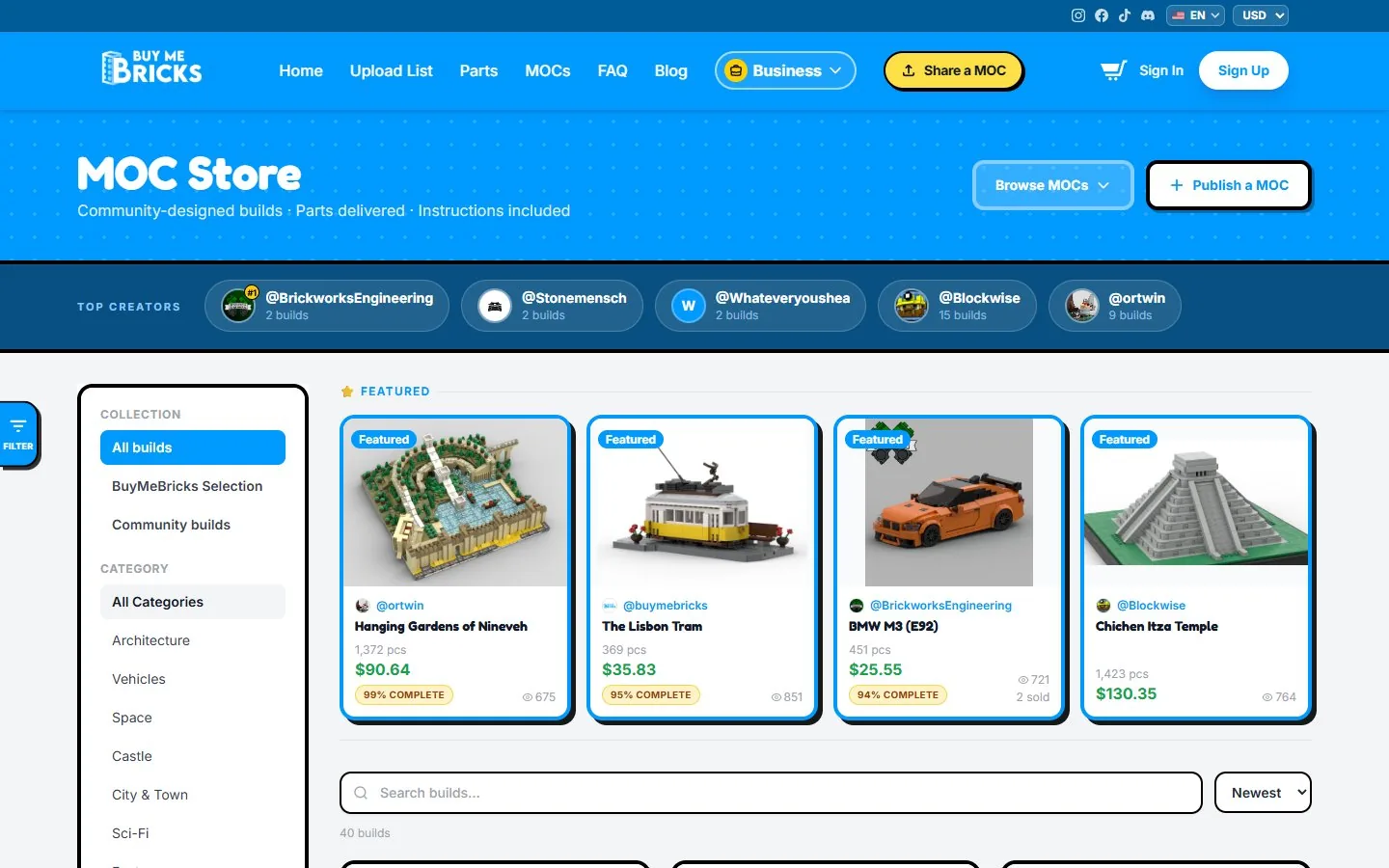
Three parties make it work:
| Who | What they do | What they get |
|---|---|---|
| The creator | Designs the model, uploads the part list, photos and PDF instructions | 85% of the designer fee on every sale (or just the glory, if they share it for free) |
| BuyMeBricks | Checks every submission, matches parts, handles payment, packing and worldwide shipping | The margin on parts and 15% of the designer fee |
| You | Pick a build and click Add to cart | Every part plus the instructions, in one parcel |
Every MOC is reviewed by our team before it goes live, so you won't find half-finished listings or part lists that don't match the photos.
4. Reading a MOC page like a pro
Each MOC has its own page. Here's what to look at before you buy:
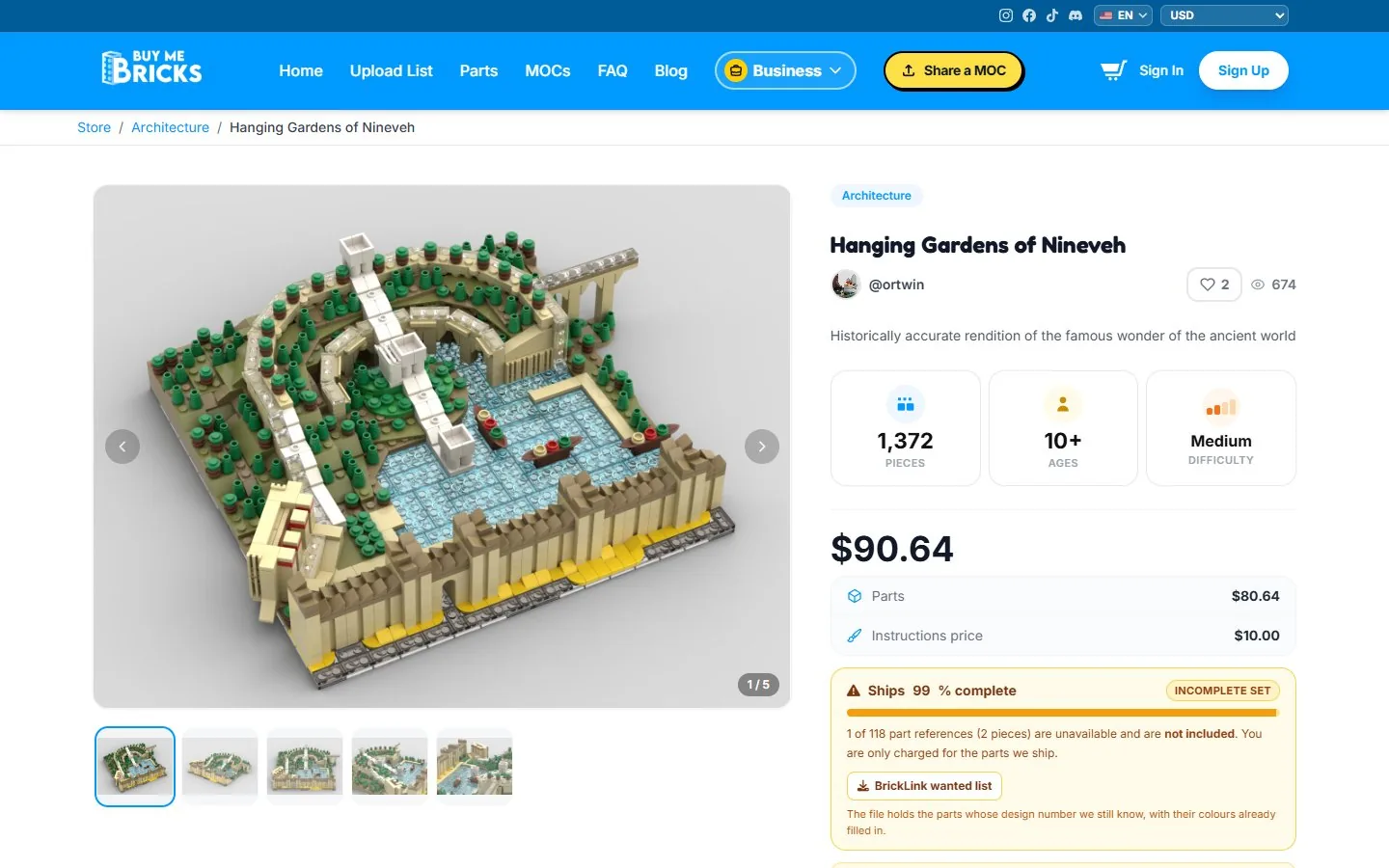
- Pieces, age and difficulty. A quick read on how big an evening (or weekend) you're signing up for.
- The price breakdown. Parts on one line, the instructions (the designer's fee) on another. No bundled mystery number.
- The completion box. Tells you if every reference is in stock. More on this below.
- Brick Points. How many loyalty points the order earns you.
- The files. How many instruction files you'll be able to download after paying.
- The community. Stars, comments with replies from the creator, verified reviews from people who actually bought it, and build photos buyers post of their finished version.
💡 Pro tip
Scroll to the build photos before you buy. Seeing the model built on someone's actual desk, not just as a render, tells you a lot about its real size and how sturdy it is.
5. How MOC pricing works (with a real example)
A MOC's price on BuyMeBricks is always:
Price = parts cost (live) + designer fee
The parts cost is calculated live from the catalogue every time the page loads, so you always see today's price, not a number someone typed six months ago. The designer fee is set by the creator. It can be zero: many creators share their designs for free and you only pay for the bricks.
Here's a real example from the store at the time of writing, Hanging Gardens of Nineveh by @ortwin:
| Pieces | 1,372 |
| Parts | $80.64 |
| Instructions (designer fee) | $10.00 |
| Total | $90.64 |
| Price per piece | ≈ 6.6¢ |
That's a large architecture model, with instructions, for less than many official sets half its size. Prices move a little with the catalogue, so check the page for today's figure. Shipping is added at checkout based on the parcel's weight and your country (and it's free on parts orders over $50 to most destinations).
6. The "% complete" badge, explained
This one feature saves a lot of frustration. Catalogues change: a mould gets retired, a colour runs out. Rather than hiding a MOC, or quietly sending you a box with holes in it, we tell you upfront exactly how complete the set ships.
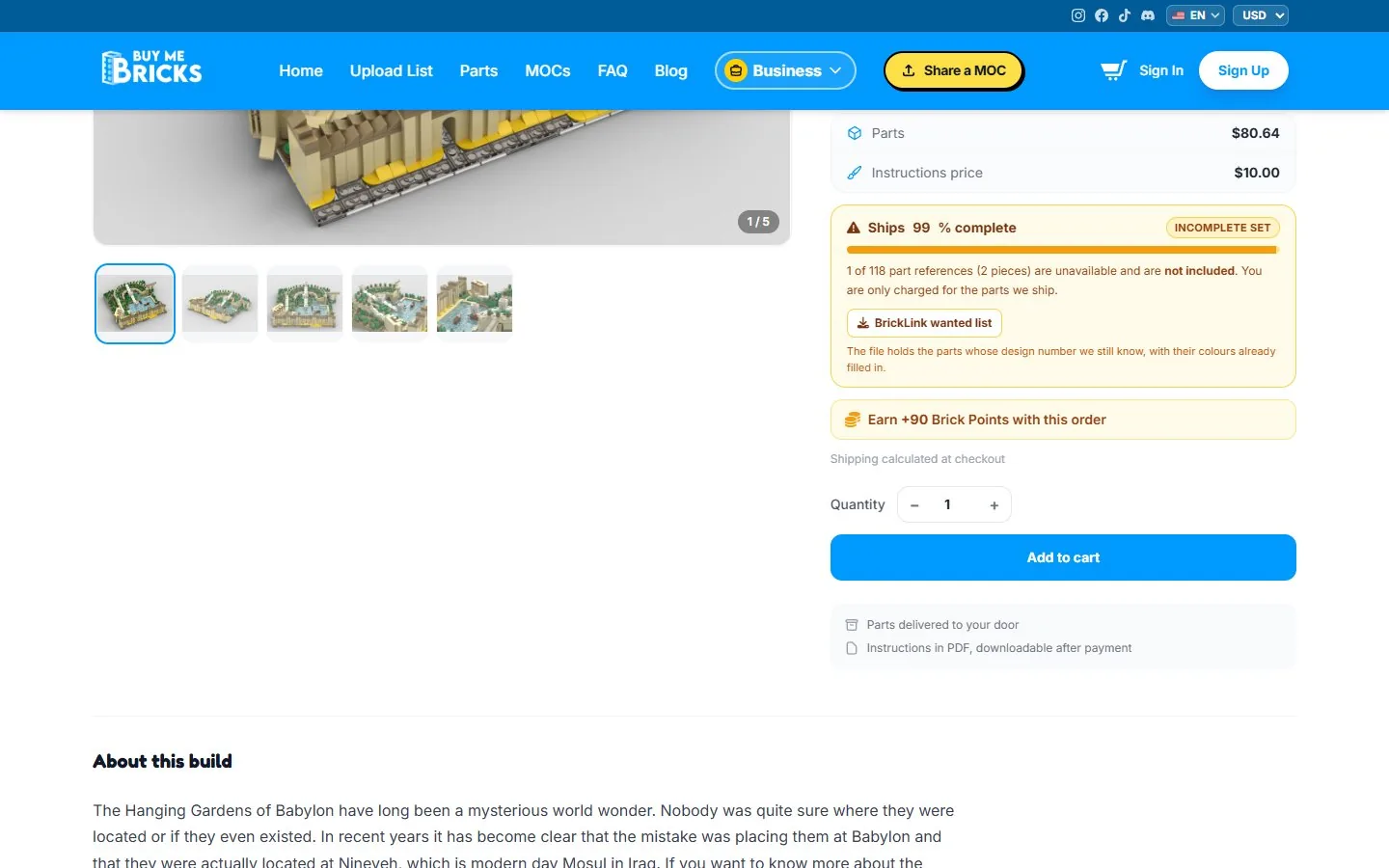
The rules are deliberately simple and on your side:
- Completion is measured in pieces, not references. Missing one part used twice isn't the same as missing one used 400 times, and the percentage reflects that.
- You're only charged for what ships. Missing parts are removed from the price.
- Below 90%, a MOC can't be bought. We'd rather not sell you a build that's mostly a shopping list.
- You can download the shortfall as a BrickLink wanted list, with colours already filled in, to source those few pieces elsewhere or pull them from your own collection.
In practice, most shortfalls are a handful of small pieces like a tile, a clip or a printed element, which any builder's spare-parts box usually covers.
7. Step by step: ordering your first MOC
- Browse the MOC Store. Filter by category (architecture, vehicles, space, castle, city & town, sci-fi…) or search by name.
- Open a MOC and check the pieces, the price breakdown and the completion box.
- Choose a quantity. Building two for a friend? The price and completion update for the number of copies.
- Click Add to cart. You can mix MOCs with loose parts in the same order.
- Check out, signed in. Your account is what unlocks the instruction download (and earns you Brick Points). Enter your address, see the exact shipping cost and pay securely with Stripe.
That's it: no spreadsheets, and nothing to reconcile across five stores.
8. After you order: delivery, instructions and build photos
Instructions: right away
The PDF instructions (plus any extra files the creator uploaded, like colour guides or LDraw models) are downloadable as soon as your payment goes through, right from the MOC's page while you're signed in. Perfect for studying the build while you wait for the bricks.
Parts: 2–4 weeks
Your parts are picked, sorted and packed by our manufacturing partner, which usually takes about a week (sometimes two), then shipped. Delivery to Europe and the USA takes 1–2 more weeks, and up to 3 for other regions. We ship to 65 countries. You can follow your order from your account page.
Something missing?
Send us a photo. If anything is missing or arrives damaged, we resend it free of charge.
Show it off
Once it's built, post a photo of your version on the MOC's page and leave a review. Creators love seeing their designs in the wild, and your photo helps the next buyer decide.
9. 5 ways to pay less for your next build
- Cross the $50 line. Shipping is free on parts orders over $50 (after discounts) to most destinations. Two smaller MOCs in one order often beat two separate orders.
- Use your Brick Points. You earn 1 point per $1 of bricks, and every 20 points is $1 off your next order. Sign in before you check out, as guests don't earn points.
- Look for free MOCs. Plenty of creators set their designer fee to zero. You pay only for the parts.
- Follow your favourite creators. You'll see their new designs first.
- Got a part list already? If the design isn't in our store, you can still upload its part list and order the bricks. Our Studio & Rebrickable tutorial shows how.
Find your next build
Community-designed MOCs, every part and the instructions, in one order.
Browse the MOC Store →10. FAQ
Are the parts compatible with the bricks I already own?
Yes. Our parts are brick-compatible and clutch with the bricks in your existing collection, so you can mix them freely.
Do I get printed instructions?
Instructions are delivered as PDF files you download after payment. Most builders use a tablet or laptop next to them, or print the pages they need.
What if a MOC shows "95% complete"?
It means 5% of the pieces can't be supplied right now. They're removed from the price, and you can download them as a BrickLink wanted list. Below 90%, the MOC can't be ordered.
How long does delivery take?
Usually 2–4 weeks in total to Europe and the USA: about 1–2 weeks to prepare the order and 1–2 weeks in transit.
Is there a minimum order?
No. You can order a single MOC, or even a single brick.


 Buy parts on BuyMeBricks · ~$24.50